2018-11-26 13:37:12 +01:00
# LSD (LSDeluxe)
2018-11-24 12:10:10 +01:00
2018-11-25 17:42:23 +01:00
[](https://raw.githubusercontent.com/Peltoche/ical-rs/master/LICENSE)
2018-11-26 13:24:14 +01:00
[](https://travis-ci.org/Peltoche/lsd)
2018-11-25 17:42:23 +01:00
[](https://crates.io/crates/lsd)
2018-12-07 13:31:00 +01:00
[](https://build.snapcraft.io/user/Peltoche/lsd)
2018-11-25 17:42:23 +01:00
2018-11-25 17:37:12 +01:00
# Table of Contents
2018-12-07 18:53:19 +01:00
- [Description ](#description )
- [Screenshot ](#screenshot )
- [Installation ](#installation )
* [Prerequisites ](#prerequisites )
2018-12-07 19:00:27 +01:00
* [On Ubuntu ](#on-ubuntu )
2018-12-07 19:23:49 +01:00
* [From Snap ](#from-snap )
2018-12-07 18:53:19 +01:00
* [From Sources ](#from-sources )
* [From Binaries ](#from-binaries )
- [Configurations ](#configurations )
* [Required ](#required )
* [Optional ](#optional )
- [Benchmark ](#benchmark )
- [Todo ](#todo )
2018-11-24 12:10:10 +01:00
## Description
2018-11-24 17:57:04 +01:00
This project is heavily inspired by the super [colorls ](https://github.com/athityakumar/colorls )
2018-12-07 14:08:51 +01:00
project but with some little differences. For example it is written in rust and not in ruby which makes it really faster ([see the benchmarks ](#benchmark )).
2018-11-24 12:21:32 +01:00
2018-11-24 12:31:28 +01:00
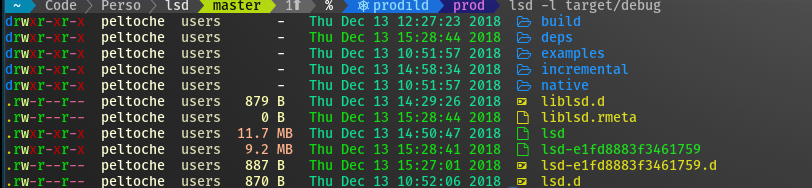
## Screenshot
2018-11-25 12:23:22 +01:00
## Installation
2018-12-04 15:13:19 +01:00
### Prerequisites
2018-12-07 18:53:19 +01:00
Install the patched fonts of powerline nerd-font and/or font-awesome. Have a look at the [Nerd Font README ](https://github.com/ryanoasis/nerd-fonts/blob/master/readme.md ) for more installation instructions. Don't forget to setup your terminal in order to use the correct font.
2018-12-04 15:13:19 +01:00
2018-12-07 19:00:27 +01:00
### On Ubuntu
2018-12-04 15:01:42 +01:00
2018-12-07 19:05:30 +01:00
_... and other Debian-based Linux distributions_
2018-12-04 15:01:42 +01:00
2018-12-07 19:00:27 +01:00
Download the latest .deb package from the [release page ](https://github.com/Peltoche/lsd/releases ) and install it via:
```sh
sudo dpkg -i lsd_7.2.0_amd64.deb # adapt version number and architecture
```
2018-12-04 15:01:42 +01:00
2018-12-07 19:23:49 +01:00
### From Snap
```sh
sudo snap install lsd
```
2018-12-07 18:53:19 +01:00
### From Sources
With Rust's package manager cargo, you can install fd via:
2018-12-04 15:13:19 +01:00
```sh
2018-12-07 18:53:19 +01:00
cargo install fd-find
2018-12-04 15:13:19 +01:00
```
2018-11-25 12:23:22 +01:00
2018-12-07 18:53:19 +01:00
### From Binaries
The [release page ](https://github.com/Peltoche/lsd/releases ) includes precompiled binaries for Linux and macOS.
2018-12-04 15:09:47 +01:00
## Configurations
2018-12-04 15:07:15 +01:00
### Required
In order to use lsd instead of the default ls you need to add this to you shell
configuration file (~/.bashrc, ~/.zshrc, etc.) :
2018-12-04 15:11:02 +01:00
```sh
2018-12-04 15:07:15 +01:00
alias ls='lsd'
```
### Optional
Some examples of useful aliases. You can add this to you shell configuration
file (~/.bashrc, ~/.zshrc, etc.) just under the alias above :
2018-12-04 15:11:02 +01:00
```sh
2018-12-06 13:10:04 +00:00
alias l='ls -l'
alias la='ls -a'
alias lla='ls -la'
alias lt='ls --tree'
2018-12-04 15:07:15 +01:00
```
2018-11-25 17:31:46 +01:00
## Benchmark
Result from `hyperfine --warmup 10 'lsd -la /etc/*' 'colorls -la /etc/*' --export-markdown out.md` :
| Command | Mean [ms] | Min…Max [ms] |
|:---|---:|---:|
| `lsd -la /etc/*` | 11.0 ± 0.5 | 9.9…13.0 |
| `colorls -la /etc/*` | 503.3 ± 5.6 | 494.6…513.4 |
2018-11-24 12:21:32 +01:00
## TODO
- [x] Handle the `-l` option (used by default for now)
- [x] Handle the `-a` option
2018-11-24 13:05:44 +01:00
- [x] Add icons before the files names
2018-12-01 16:53:49 +01:00
- [x] Handle all the file types (block/char/pipe/etc)
2018-12-04 14:54:56 +01:00
- [x] Handle the tree (`--tree` ) output option
2018-11-24 12:21:32 +01:00
- [ ] Handle the json (`--json` ) output option
